Find your flow
Bring frequently used apps and folders into a clear, comfortable workspace.
A modern Dock for Windows 11.
Your apps, files, folders and Windows essentials, brought together in one elegant workspace.
Same Windows. A better flow.

THE EVERYDAY, RECONSIDERED
Your desktop is where everything starts. Dockvia brings a calmer rhythm to the things you do all day.
Bring frequently used apps and folders into a clear, comfortable workspace.
A considered dock surface keeps the essentials visually connected.
A Windows-first direction, with familiar controls and an unmistakably modern feel.
Dockvia in action
Hover, tap or use the arrow keys to explore.
Apps, folders and tools in one focused surface.

Interactive demonstration using real Dockvia app icons.
SMALL DETAILS. BIG DIFFERENCE.
Keep the things you use most within reach, with thoughtful controls for your everyday desktop.
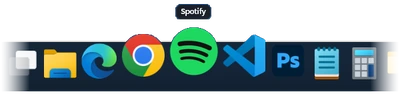
Responsive icon magnification and smooth hover motion, with Dock sizes to suit your desktop.
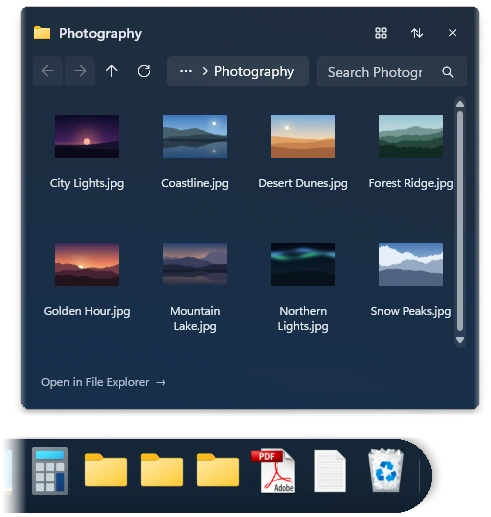
Pin files and folders. Browse Folder Stacks directly from the Dock and open the item you need.
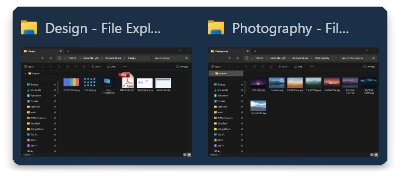
Preview open windows, switch between them and use Live Peek to find the right one. Close windows from supported previews.
Persistent pins, running apps and drag-and-drop pinning keep your everyday tools close.
Reach common app actions, browser tasks and supported recent or frequent items from context menus.
Adjust the Dock size and magnification. Dockvia follows your Windows light or dark theme and taskbar alignment.
MADE WITH WINDOWS IN MIND
Keep familiar Windows features close. Dockvia works alongside Start, Search, Task View, Widgets and Explorer.
Open Start or Windows Search directly from your Dock and stay in your flow.
Move between tasks and access Windows Widgets from the same focused workspace.
Open the native Windows Recycle Bin and see its empty or full state at a glance.
SEE THE DETAILS
A closer look at Dockvia on Windows 11. Real product imagery, familiar apps and a more considered desktop.

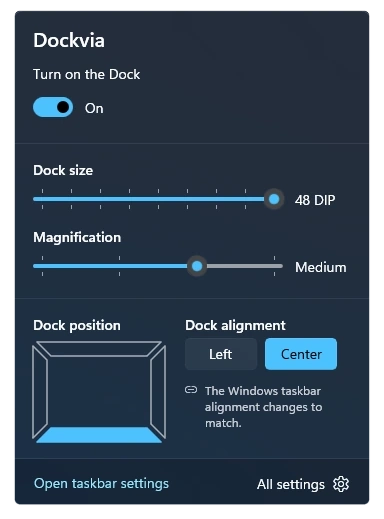
Adjust size and magnification from the tray panel, or open the full settings.
Follow your Windows display language or choose one of 49 languages in Dockvia settings. Website languages are separate.
Dockvia follows your Windows taskbar position. Top, left and right edges are available on supported Windows configurations; earlier versions use the bottom edge.
YOUR NEXT DESKTOP EXPERIENCE
Bring your everyday essentials together in a Dock that feels at home on Windows.

Price in USD. Local prices are shown in the Microsoft Store. Try Dockvia free for 15 days.
Dockvia is a premium Dock utility for Windows 11. It brings apps, files, folders and Windows essentials together in one workspace.
Yes. Pin working files and folders to your Dock, and use Folder Stacks to browse folder contents directly.
Requires Windows 11 version 24H2 or later and an x64 PC.
Yes. Use drag and drop to pin apps, files and folders to the Dock.
Switch between the Dockvia Dock and the Windows taskbar from the tray icon. Returning to Windows mode restores the taskbar.
Dockvia is available from the Microsoft Store. You can try it free for 15 days before you buy.
Follow your Windows display language or choose one of 49 languages in Dockvia settings. Website languages are separate.
Dockvia follows your Windows taskbar position. Top, left and right edges are available on supported Windows configurations; earlier versions use the bottom edge.